Granola
Notepad that turns back-to-back meetings into rich, searchable notes automatically.
Overview
Granola: AI Notepad That Turns Back-to-Back Meetings Into Searchable Memory
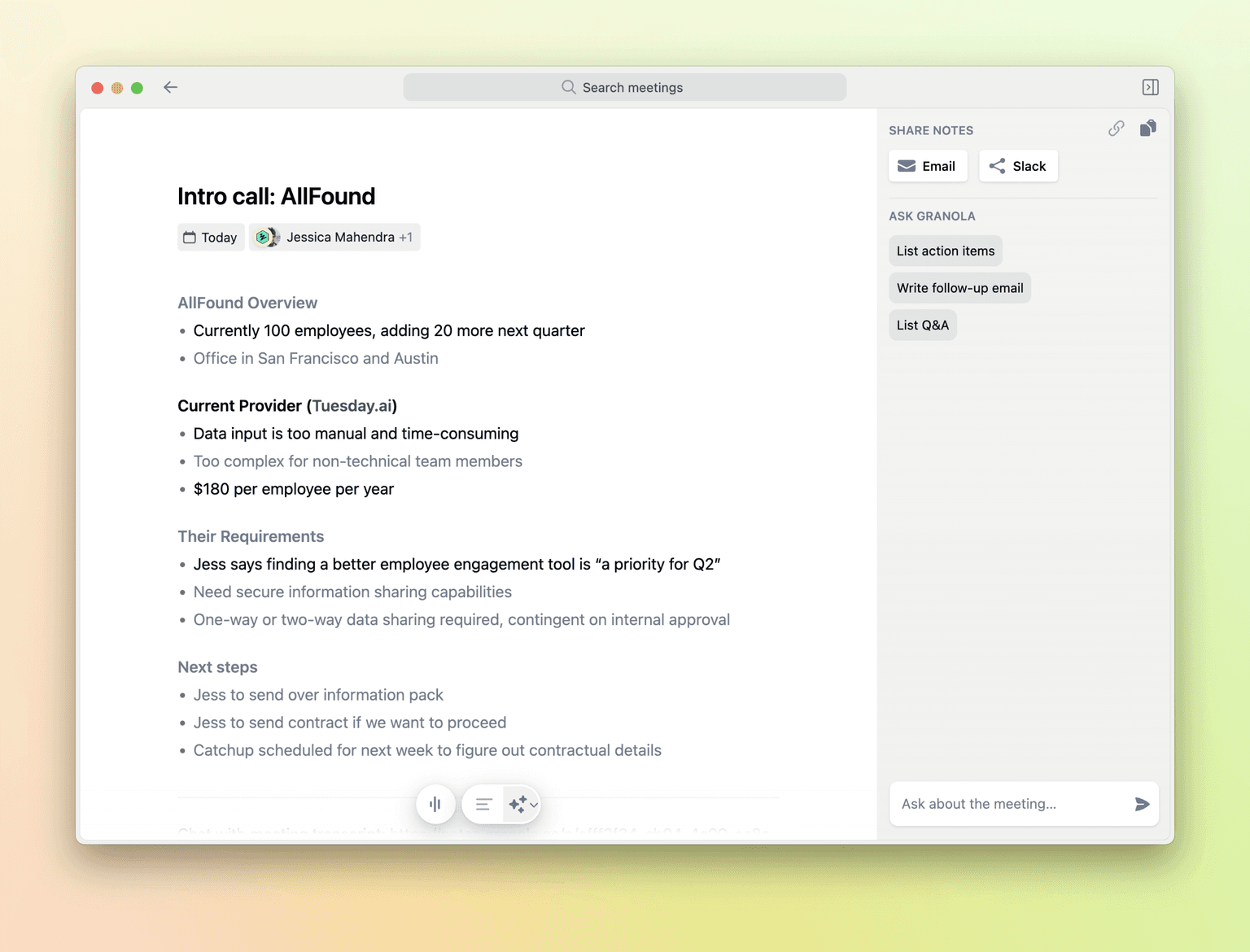
Granola is the AI notepad designed for people who run back-to-back meetings. You take light notes during the call, and Granola transcribes the audio in the background, then expands your notes into a clean, searchable summary that retains your structure and intent. Founders, sales reps, product managers, recruiters, and investors use Granola to stay present in conversations while still walking away with high-quality notes, action items, and a long-running, AI-searchable memory of every meeting.
Key Features:
- Live transcription of any meeting on your computer with no bot in the call
- AI-augmented notes that build on what you typed during the meeting
- Searchable, taggable history of every meeting and conversation
- Mac, Windows, and mobile apps with the same account and library
- Templates for sales calls, founder updates, user research, and 1:1s
- Folders, sharing, and team workspaces for collaborative knowledge
- AI chat over your full meeting history for instant recall
- Integrations with Notion, Slack, Salesforce, HubSpot, and more
- Privacy controls and per-meeting opt-out for sensitive conversations
Ideal Use Case:
Granola is built for founders, sales reps, product managers, and investors who run back-to-back calls and want a real notepad they can trust. It is especially strong for people who refuse to put a bot in the meeting but still want structured, AI-augmented notes after every call.
Why Use Granola:
- Stay present in meetings without losing notes or context
- Get clean, structured summaries on top of your own light notes
- Search every meeting you have ever had like a personal knowledge base
- Skip noisy meeting bots while still capturing high-quality notes
- Use templates tailored to sales, fundraising, research, and product work
- Share notes and snippets with teammates inside structured workspaces
FAQ
Is Granola free? Yes. Granola has a free tier for personal use. Pro is about $18/month per user, with Business and Enterprise plans available.
Does Granola put a bot in my meetings? No. Granola transcribes the audio on your machine, so there is no extra bot to invite or worry about.
What apps does Granola work with? Notion, Slack, Salesforce, HubSpot, Google Calendar, and other tools via integrations and exports.
Does Granola support mobile? Yes. Granola has Mac, Windows, and mobile apps that share the same account and notes.
How is Granola different from Otter or Fireflies? Granola focuses on the notepad experience for back-to-back human users, with AI augmenting your own notes rather than replacing them with raw transcripts.
FAQ
What does Granola do? Granola automatically converts your back-to-back meetings into rich, searchable notes without any manual effort on your part. It captures and organizes meeting content so you can focus on the discussion instead of note-taking.
Who should use Granola? Granola works well for founders, venture capitalists, product teams, and anyone juggling multiple meetings daily who needs reliable meeting documentation without the friction of manual note-taking.
How much does Granola cost? Granola offers a freemium model with free access for basic personal use. For advanced features, paid plans are available starting at a low monthly per-user cost. Visit the Granola pricing page for current plans and to see which tier fits your needs.
How does Granola compare to other AI tools? While tools like ChatGPT, Gemini, and Perplexity.ai are general-purpose AI assistants, Granola is purpose-built specifically for meeting automation, transforming your calendar into automatically documented notes without requiring separate prompts or manual input.
FAQ
What does Granola do? Granola automatically converts your back-to-back meetings into rich, searchable notes without any manual effort on your part. It captures and organizes meeting content so you can focus on the discussion instead of note-taking.
Who should use Granola? Granola works well for founders, venture capitalists, product teams, and anyone juggling multiple meetings daily who needs reliable meeting documentation without the friction of manual note-taking.
How much does Granola cost? Granola offers a freemium model with free access for basic personal use. For advanced features, paid plans are available starting at a low monthly per-user cost. Visit the Granola pricing page for current plans and to see which tier fits your needs.
How does Granola compare to other AI tools? While tools like ChatGPT, Gemini, and Perplexity.ai are general-purpose AI assistants, Granola is purpose-built specifically for meeting automation, transforming your calendar into automatically documented notes without requiring separate prompts or manual input.
tl;dr:
Granola is the AI notepad for people who live in back-to-back meetings. You stay present, take light notes, and Granola turns your calls into a clean, searchable, AI-augmented memory across every conversation you have.
Related
Looking for more options? Browse the Productivity directory or read our best AI productivity tools listicle. Granola has a Wikipedia entry and is tracked on Crunchbase.
Why Use Granola
FAQ
Editorial Review
Our take on Granola.

Turns meeting chaos into searchable notes automatically; solid execution, but mainly saves time for people in a lot of meetings.
What works
- Automatic transcription and summarization saves real time for meeting-heavy roles
- Freemium entry point, paid features are clear and unambiguous
- Runs locally with no bot joining the call; now on Windows as well as macOS
What doesn't
- Only valuable if you're in many meetings; niche use case outside that context
- Quality depends on audio clarity and whether summaries match your workflow
Granola sits in your calendar and records meetings, then transcribes and summarizes them into searchable notes. It's the kind of tool that solves a real problem—most meeting notes are terrible—and the execution seems straightforward enough.
The freemium model is sensible. Free tier gets you basic capture and search; paid tiers unlock better summaries and integrations. That's a fair unlock. The catch is the obvious one: this tool only has value if you're in a lot of meetings. If you're mostly heads-down coding or doing async work, it's noise. And like most transcription tools, quality depends on audio clarity and whether Granola's LLM actually understands your domain or meeting style.
Granola is YC-backed, which usually means decent funding and product discipline. This is a legitimate productivity gain for the right user—someone running back-to-back calls who currently writes notes by hand or relies on slack transcripts.
User Reviews
Similar Tools