Fellow
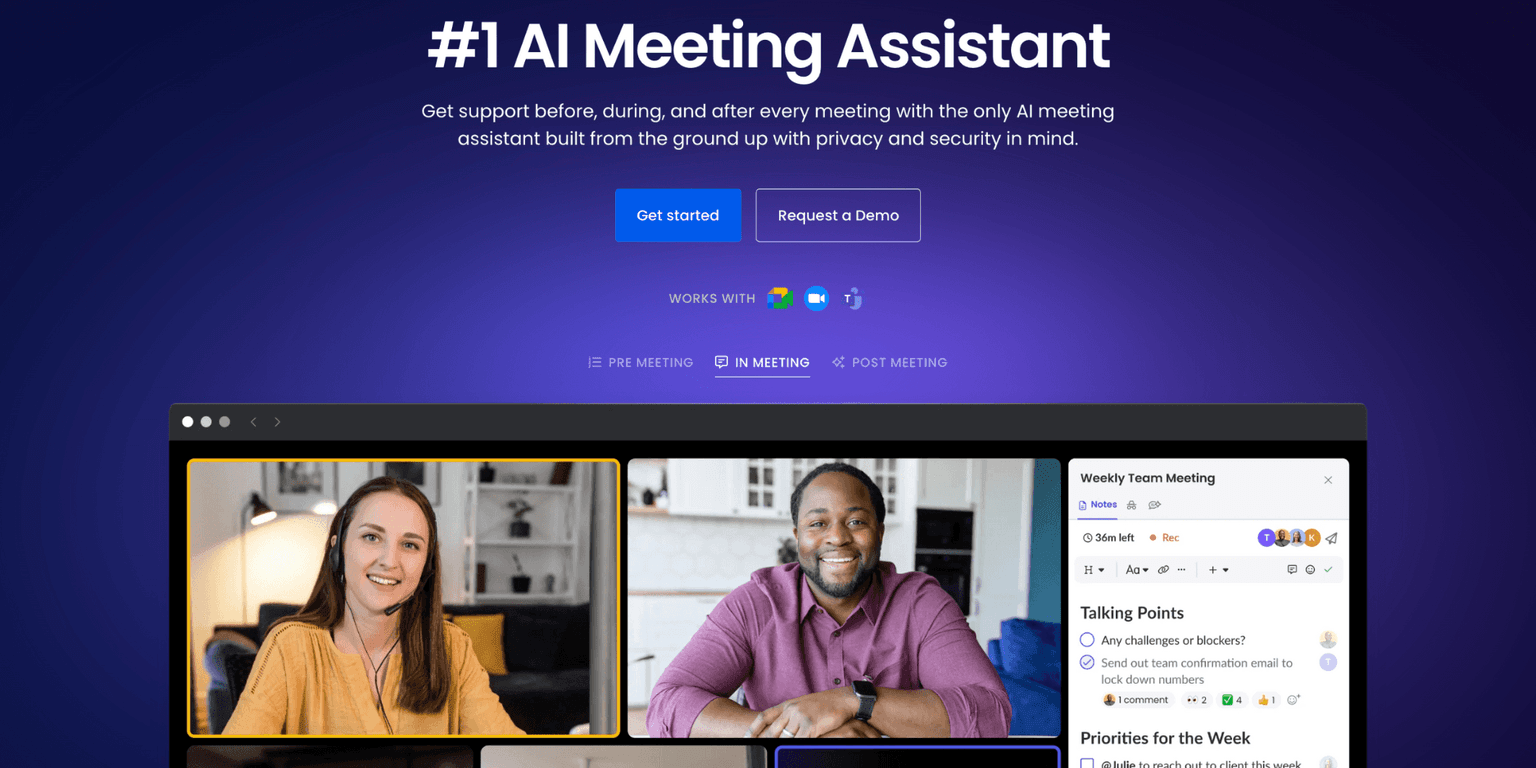
Fellow is the only AI meeting assistant built with privacy and security in mind. It supports the before, during, and after every meeting.
Overview
Enhance Meeting Productivity with Fellow.app's AI Meeting Assistant
Fellow.app is an AI-driven meeting assistant designed to streamline the entire meeting process—from preparation to follow-up. It offers features like automated recording, transcription, and summarization, enabling teams to focus on discussions without the distraction of manual note-taking. Additionally, Fellow.app provides collaborative agenda creation, action item tracking, and seamless integrations with popular tools to ensure meetings are efficient and outcomes are clear.
Key Features:
- AI Meeting Copilot: Automatically records and transcribes meetings with human-level accuracy, supporting over 35 languages.
- Collaborative Agendas: Allows teams to create and share meeting agendas, ensuring all participants are aligned on discussion topics.
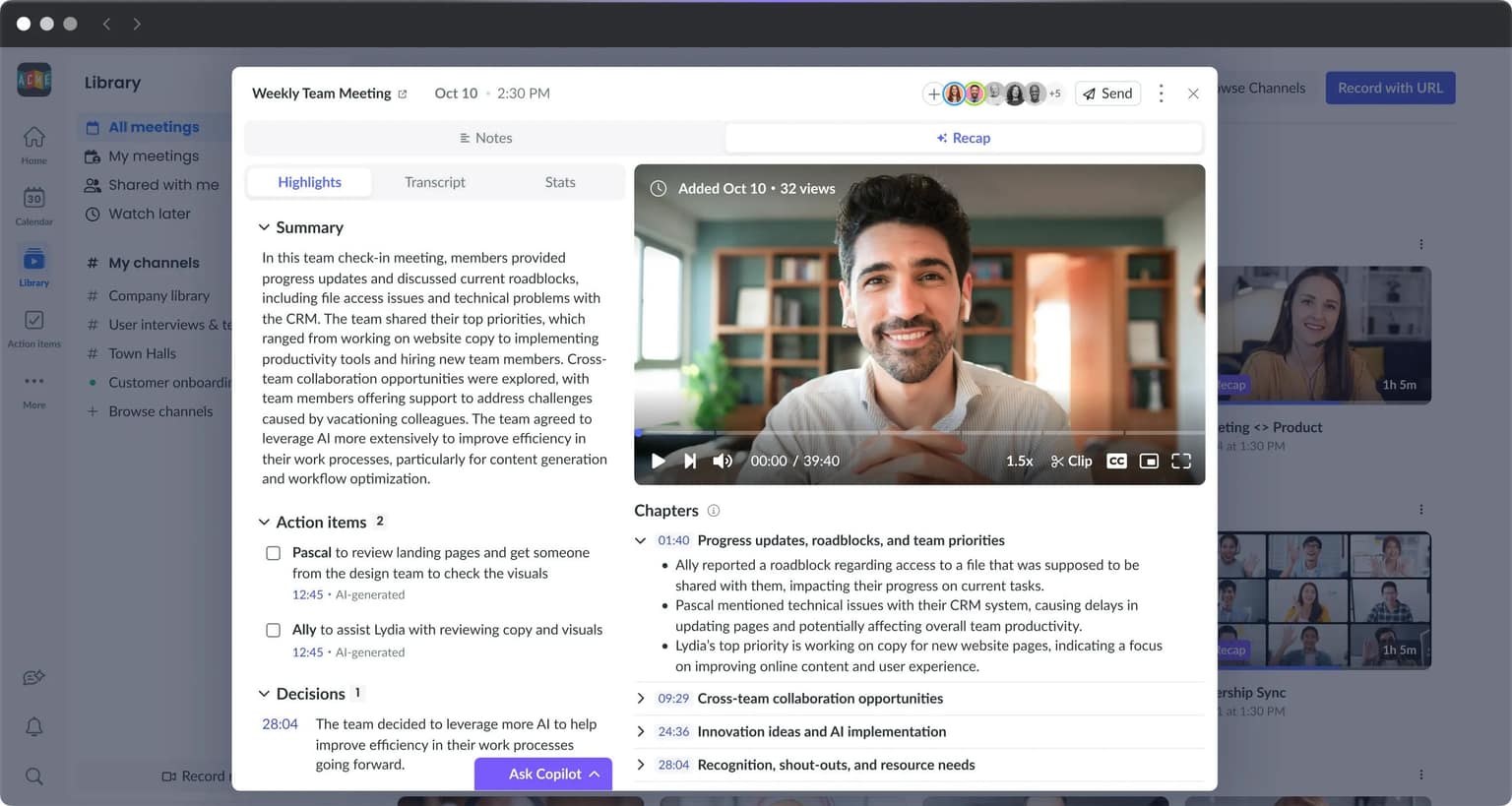
- AI-Generated Summaries: Provides concise summaries of key points, decisions, and action items, making it easy to revisit discussions and align on next steps.
- Action Item Tracking: Assign, visualize, and prioritize meeting to-dos in one centralized location, fostering accountability.
- "Ask Fellow" AI Assistant: A built-in AI assistant that can answer questions about past meetings, providing instant insights and helping users stay informed without sifting through extensive notes.
- Seamless Integrations: Connects with over 50 productivity tools, including Google Meet, Zoom, Microsoft Teams, Slack, Asana, and Jira, ensuring it fits smoothly into existing workflows.
Ideal Use Case:
Fellow.app is ideal for teams and organizations aiming to improve meeting efficiency, ensure accurate record-keeping, and enhance collaboration through AI-powered tools.
Why Use Fellow.app:
- Accurate Transcriptions: Ensures no detail is missed during meetings, with searchable transcripts for easy reference.
- Enhanced Collaboration: Facilitates shared agendas and action items, keeping teams aligned and accountable.
- Time-Saving Summaries: AI-generated recaps allow participants to quickly grasp key points and decisions without reviewing entire transcripts.
- Comprehensive Integrations: Fits seamlessly into existing workflows by integrating with a wide range of productivity tools.
- User-Friendly Interface: Offers an intuitive platform suitable for both beginners and professionals, enhancing user adoption.
FAQ
What does Fellow do during meetings? Fellow is an AI meeting assistant that helps you before, during, and after every meeting. It's designed with privacy and security as core features to protect your meeting data.
Who should use Fellow? Fellow is built for teams and professionals who want an AI meeting assistant that prioritizes confidentiality and secure handling of meeting information throughout the entire meeting lifecycle.
What's the pricing model for Fellow? Fellow operates on a freemium model, meaning you can start using it for free and upgrade to paid features as needed. Visit the Fellow pricing page for current plans.
How does Fellow compare to other AI tools? Unlike general-purpose AI assistants like ChatGPT, Gemini, or Perplexity.ai, Fellow is specifically designed as a meeting assistant with built-in privacy and security protections for the before, during, and after phases of your meetings.
tl;dr:
Fellow.app is an AI-powered meeting assistant that automates recording, transcription, and summarization, while also providing tools for collaborative agendas and action item tracking, enhancing overall meeting productivity.
Related
Looking for more options? Browse the Productivity directory or read our best AI productivity tools listicle. Fellow is also tracked on Crunchbase.
Why Use Fellow
Editorial Review
Our take on Fellow.

Privacy-first meeting assistant that handles the whole arc—prep, capture, follow-up—without the surveillance tax.
What works
- Privacy-by-design positioning reduces governance friction
- Three-phase structure (prep, capture, synthesis) is thoughtful
- Freemium model lets you test before commitment
What doesn't
- Unclear how note quality compares to incumbents
- Integration depth with existing stacks not detailed
Fellow positions itself as the privacy-conscious alternative in a space where many meeting tools are content-vacuum cleaners. The three-phase approach (before, during, after) is sensible: you prep with it, it captures during the call, then helps you synthesize after. That structure matters if you're someone who actually wants to do something with meeting notes instead of letting them pile up in Slack.
The freemium model is a smart entry point—you get to feel the friction (or lack thereof) before deciding if it's worth expanding. The positioning around privacy is increasingly table stakes rather than a feature, but it's a table stakes that matters when you're discussing sensitive strategy or client work.
What's less clear from the facts: how Fellow actually compares to the incumbents (Notion, Google Meet's native notes, Otter) on note quality, search, or integration stickiness. The alternatives listed are broad-spectrum AI tools rather than direct meeting-note competitors, which makes positioning harder to assess. If you're meeting-note-heavy and privacy-conscious, it's worth the friction of trying it.
User Reviews
Similar Tools